





Proxy Residencial QUENTE
Rastreamento humanizado, sem blindagem IP. Desfrute de 90 milhões de IPs reais de 220+ locais
 2025-04-21 17:50:52 actualização
 16583 ver
 5 Minutos para ler
Before configuring, please Get Proxy first
Step 1:Open the Firefox
Step 2. Click Set icon> Settings (or Preferences on macOS).
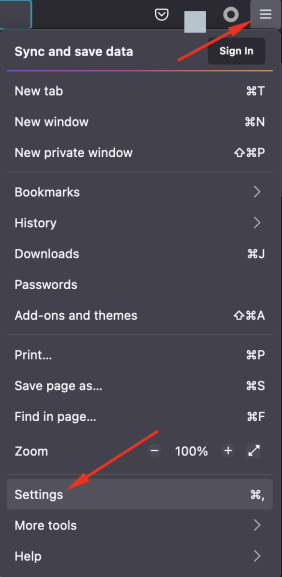
Step 3:Click on the General tab.
Step 4:Scroll down to the Network Proxy section, and then click Settings.
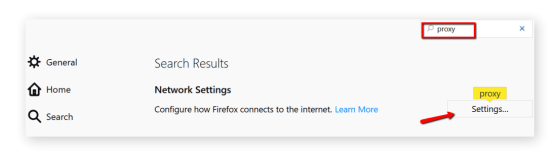
Step 5:Select the manual proxy configuration box.
Step 6:Add the ip address or host address and the port to the HTTP proxy field. Select to also use this proxy for the FTP and HTTPS check boxes.
Collect Web Data Easily with OmegaProxy Residential Proxies

Um dos melhores proxies. Mais de 90 milhões de IPs estão ativos em todo o mundo. Selecione um endereço IP de qualquer país ou cidade.






