





आवासीय प्रॉक्सी गरम
गरममानवीय रेंगने, कोई आईपी परिरक्षण.220+ स्थानों से 90M असली आईपीएस का आनंद लें
 2025-04-21 17:50:52 updated
 16586 देखें
 5 मिनट पढ़ना
Before configuring, please Get Proxy first
Step 1:Open the Firefox
Step 2. Click Set icon> Settings (or Preferences on macOS).
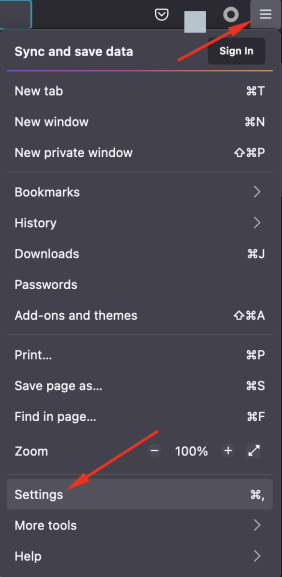
Step 3:Click on the General tab.
Step 4:Scroll down to the Network Proxy section, and then click Settings.
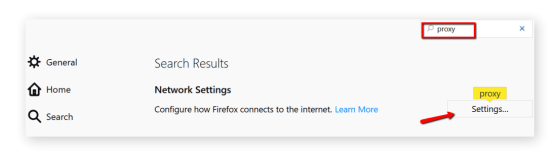
Step 5:Select the manual proxy configuration box.
Step 6:Add the ip address or host address and the port to the HTTP proxy field. Select to also use this proxy for the FTP and HTTPS check boxes.
Collect Web Data Easily with OmegaProxy Residential Proxies

सर्वश्रेष्ठ एजेंटों में से एकविश्व भर में 90 मिलियन से अधिक बीमाकृत व्यक्ति सक्रिय हैं।किसी भी देश या शहर के लिए एक आईपी पता चुनें





