





Ủy quyền cư trú Nóng
NóngLà con người, không có lá chắn IP. Thưởng thức 90M thiết bị IPs thực từ 220 địa điểm
 2026-10-30 18:34:28 cập nhật
 174 kiểm tra
 5 phút để đọc
A practical build guide from the engineers at ScrapeCrew: fetch, proxy, validate, store and alert, without silent failures or stale prices.
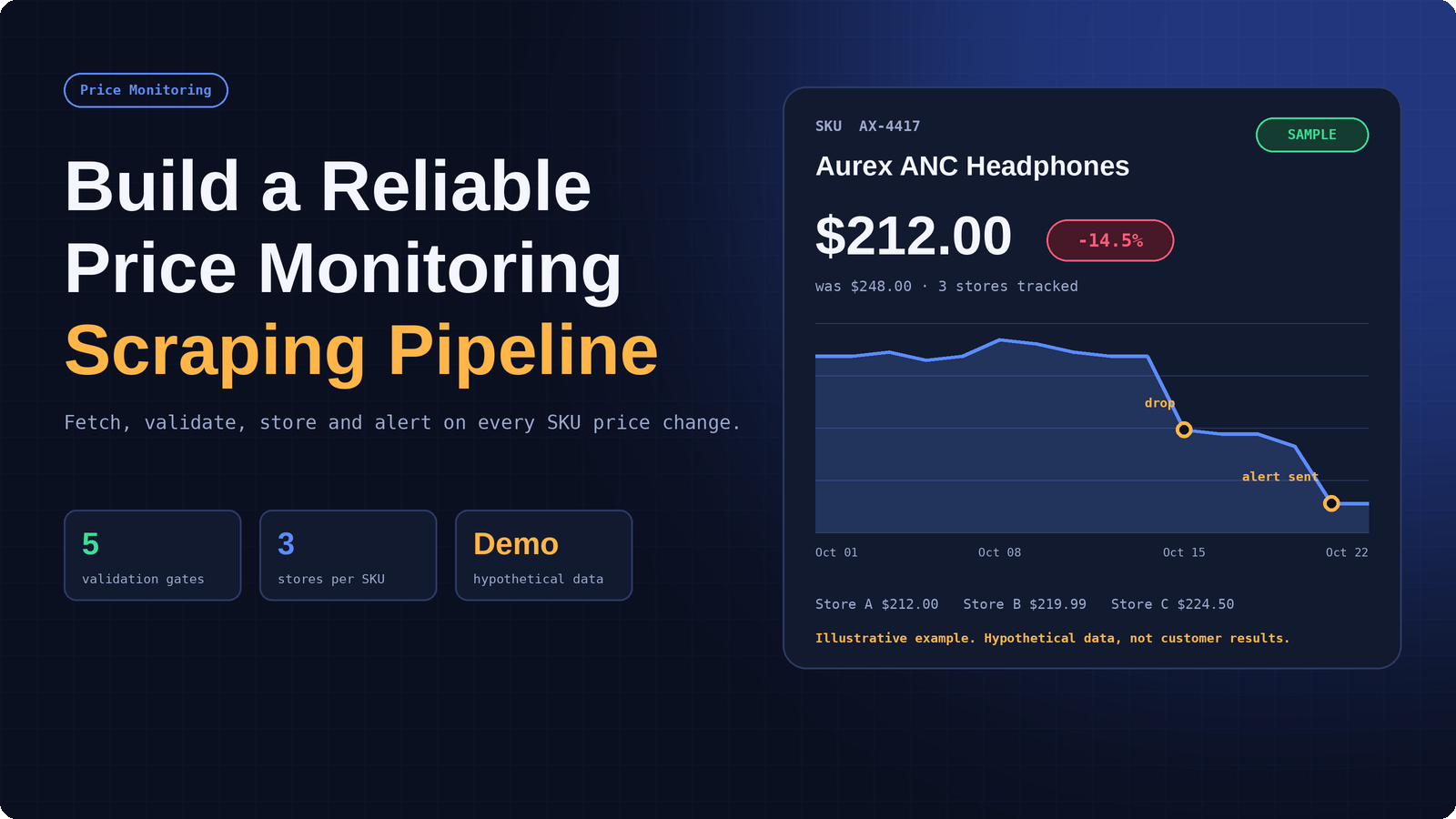
A price monitoring pipeline records every SKU change, checks it against validation gates, and alerts the team when a tracked store moves. Illustrative example with hypothetical data, not customer results.
Most teams start price monitoring with a script. A developer writes a few selectors, loops over a list of product URLs, and saves prices to a spreadsheet. It works for a week. Then a retailer redesigns a category page, a proxy starts returning blocked responses, a currency symbol changes format, and the sheet quietly fills with blanks and wrong numbers. Nobody notices until a pricing decision is made on bad data.
This guide explains how to build a web scraping pipeline for e-commerce price monitoring that avoids that outcome. It covers eight stages: scoping the SKU map, choosing the right fetch method, routing requests through a proxy layer, parsing and normalizing prices, validating every record, storing history with change detection, scheduling with safe retries, and monitoring the whole system. It is written by the team at ScrapeCrew, a web scraping and data pipeline company that builds and maintains monitored extraction systems for retail, brand, and pricing teams.
A note on the examples: every price, chart and metric shown in the images, tables and code below is a hypothetical illustration. None of them are customer results, benchmarks or guarantees, and your own numbers will depend on the stores you track, the methods you use and how often they change.
Everything here applies whether you build in-house or hire a partner. The goal is a pipeline that is boring in the best sense: it runs on schedule, tells you when it breaks, and produces price data you can trust.
Price is the most visible variable in online retail, and shoppers compare it constantly. An August 2026 consumer survey by Akeneo and Dynata found that 46% of US shoppers compare prices across multiple retailers before buying, and 77% had noticed the same product listed at different prices across retailers or platforms in the past year. Only 32% said they trust retailers to offer a fair or competitive price. When customers are checking, your competitors are checking too, and your own pricing team needs data that is at least as fresh as theirs.
The collection side is getting harder at the same time. Imperva's 2026 Bad Bot Report reports that bots now account for more than 53% of all web traffic, with about 40% classified as malicious. Retail sites respond with stronger bot defenses, rate limits, and JavaScript-heavy pages, and those defenses do not distinguish well between a harmful bot and a polite monitoring job. A reliable pipeline has to be designed for that environment from day one: low-volume, well-identified, validated, and observable.
Before choosing tools, agree on the shape of the system. A production pipeline has six stages plus two layers that cut across them: a scheduler on top and monitoring underneath. Separating the stages matters because each one fails in a different way. A blocked request is a network problem, a missing price is a parsing problem, and a price that is 90% lower than yesterday is a data quality problem. If everything lives in one script, every failure looks the same.
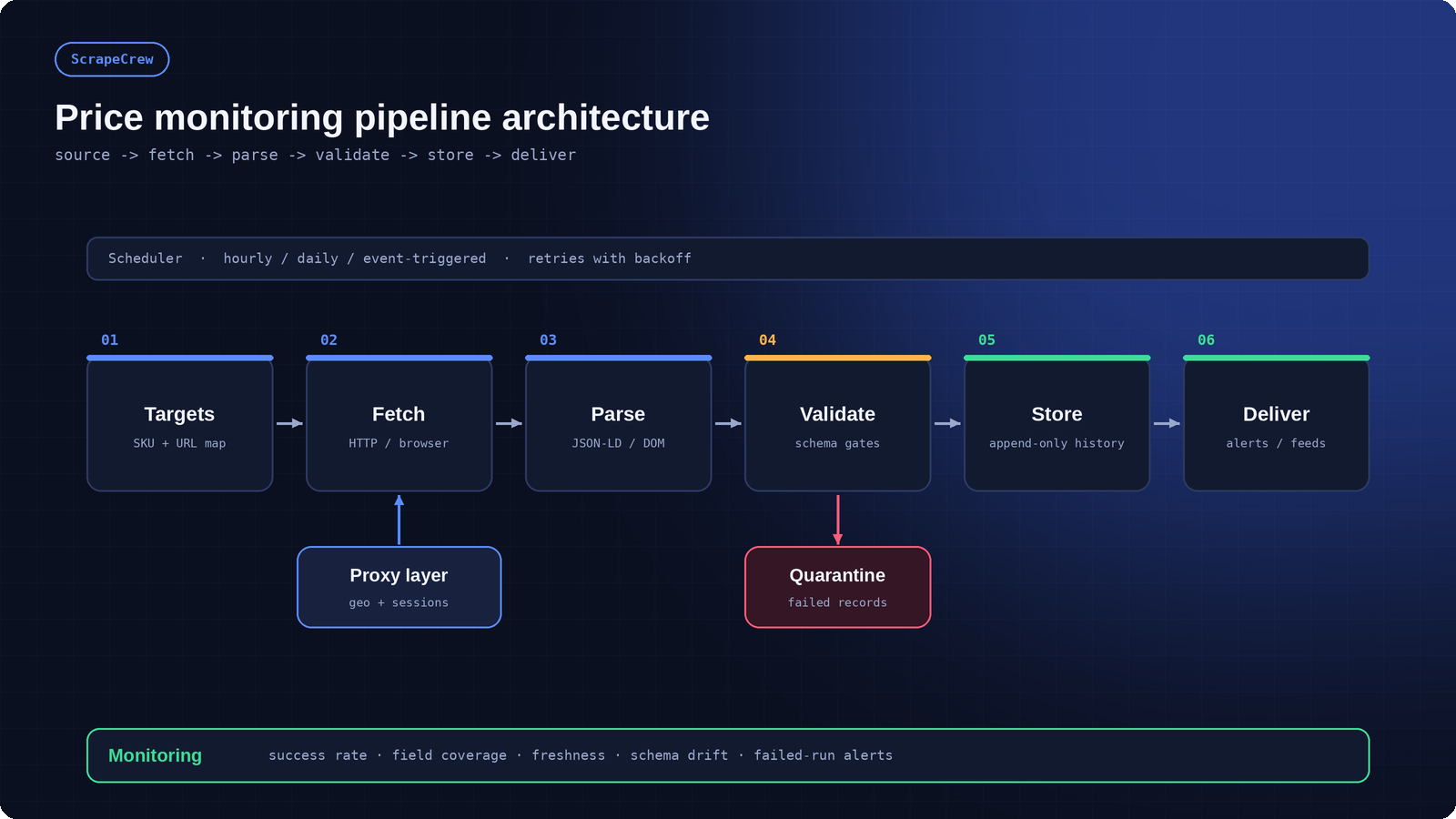
Six pipeline stages with a proxy layer feeding fetch, a quarantine path off validation, a scheduler above, and monitoring below.
Stage | What it does | Failure it prevents |
|---|---|---|
Targets | Holds the SKU list, store URLs, expected currency and product identifiers | Uneven coverage and missed items |
Fetch | Requests pages or API endpoints through the right method and proxy route | Blocks, timeouts and empty pages |
Parse | Extracts price, stock, title and identifiers from JSON-LD, APIs or the DOM | Selector breakage after a redesign |
Validate | Applies schema, range, currency, identity and freshness checks | Wrong prices entering reports |
Store | Writes an append-only price history with idempotent inserts keyed by SKU, store and observation time | Retry duplicates and lost history |
Deliver | Sends alerts, CSV, JSON, Sheets or warehouse loads | Data that exists but never reaches a decision |
The most common cause of poor monitoring data is not technical. It is a vague target list. Start by writing down which products you track, in which stores, in which regions, and how often each one needs to refresh. A fast-moving electronics category might justify hourly checks. A slow home goods catalog may only need daily runs. Matching frequency to need keeps request volume low, which protects both your proxy budget and the target sites.
Next, decide how you will identify the same product across stores. Titles are unreliable because every retailer writes them differently. Prefer hard identifiers such as GTIN, UPC, EAN or manufacturer part number. GS1's GTIN standard is the shared global format behind most barcodes, and it is the safest join key when stores expose it. When identifiers are missing, fall back to normalized brand, model and attribute rules, and send uncertain pairs to a review queue. This process is called SKU matching, and getting it right is what makes a price comparison meaningful rather than misleading. For example, a $20 gap between a single item and a three-pack is not a price difference.
Finally, record the fields you need beyond price: currency, availability, shipping cost, seller, condition (new or refurbished), and the timestamp of observation. Fields you do not capture on day one are impossible to reconstruct later, because past prices cannot be re-fetched.
There is no single best way to collect prices. The right method depends on how each store exposes its data, and a mature pipeline usually mixes several. Always start with the most stable option and move down the list only when you must.
Method | How it works | Stability | Best for |
|---|---|---|---|
Official API | Query the retailer or marketplace API with your own credentials | High | Marketplaces with quotas you can live within |
Embedded structured data | Read Product and Offer JSON-LD from the page HTML | High | Stores that publish schema markup |
HTTP and HTML parsing | Fetch raw HTML and parse it with CSS or XPath selectors | Medium | Static catalog pages |
Browser automation | Render JavaScript in a headless browser, then extract | Medium to low | Dynamic pages, lazy loading, logged-in prices |
Scraping API | Send the URL to a managed service that handles rendering and retries | Medium | Teams that want fewer moving parts |
Structured data is the underrated option. Google asks merchants to publish Product and Offer markup with price, currency and availability so their listings can appear in search, which means many stores already expose clean, machine-readable prices in a JSON-LD block. Reading that block is faster and far less fragile than chasing a CSS class that changes with every redesign. Treat it as the first thing to try, and validate it against the visible page, because markup can lag behind a live promotion.
When a page only renders prices after JavaScript runs, use a real browser. Playwright is a solid choice for Python teams because it handles modern rendering, waits, and network inspection. For high-volume static crawling, Scrapy gives you request scheduling, item pipelines and throttling out of the box. Where an official API exists, use it. It is slower to get started and more limited in fields, but it will not break when the HTML changes.
If you want a worked example of the browser-based approach, ScrapeCrew's eBay price scraper watches saved searches, stores previous snapshots, and sends alerts only when a tracked price or listing detail changes. For cross-marketplace comparisons with product matching and fee-adjusted scoring, its ecommerce price opportunity finder shows how identity evidence, history and demand signals fit together in one pipeline.
Price monitoring often has to see a store the way a local shopper sees it. Prices, currency, shipping and even availability can vary by country, city and device. A proxy layer lets each request appear to come from the right place, and it spreads traffic so no single address carries a suspicious load. It is not a way to ignore a site's rules, and it is not the only thing that decides what price you see. It is one input into polite, geographically representative collection.
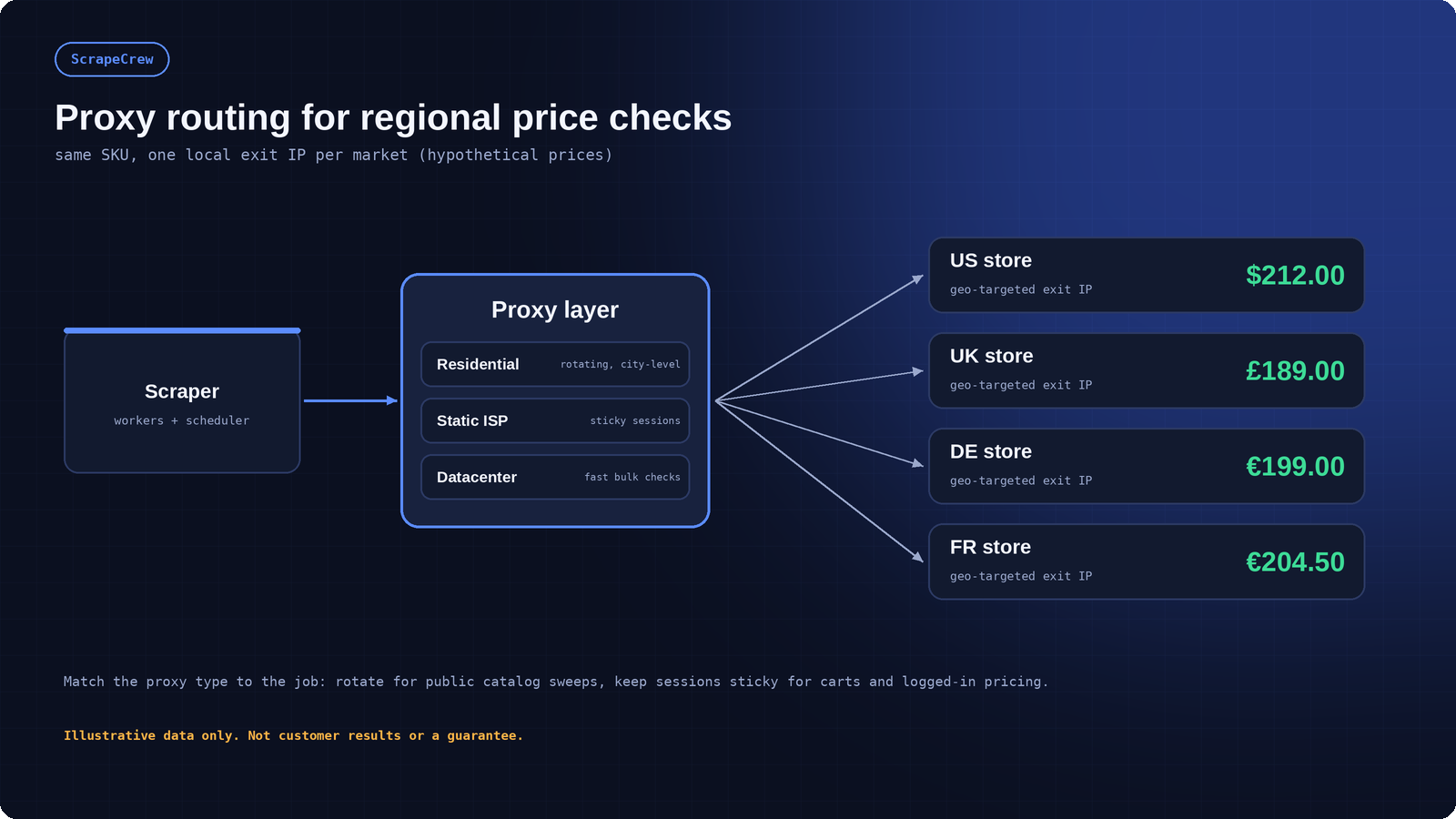
One proxy layer, several route types, and a local exit IP for each market being checked. Prices shown are hypothetical.
The proxy type should follow the workflow. OmegaProxy's residential proxies offer a pool of 90M+ residential IPs across 220+ locations, with country and city-level targeting and HTTP(S) and SOCKS5 support. That kind of coverage is useful for regional price checks, because you can send a request that appears to come from the UK and another that appears to come from Germany and compare what each store returns. The provider's own price monitoring use case describes the same pattern: broad IP coverage plus geo-targeting to gather publicly available pricing data reliably.
Proxy type | Session behavior | Typical speed | Best fit in price monitoring |
|---|---|---|---|
Residential rotating | New exit IP per request or interval | Variable | Public catalog sweeps and regional price checks |
Static residential or ISP | Same IP held for long periods | Consistent | Sticky sessions, carts, member pricing |
Datacenter | Fixed or pooled hosting IPs | Fast | Bulk checks on tolerant, low-risk targets |
Mobile | Carrier-assigned IPs | Carrier dependent | Mobile-only prices and app-aligned views |
Three practical rules keep a proxy layer healthy. First, use rotation for public, logged-out pages and sticky sessions wherever a price depends on a cart, a login or a multi-step flow, because changing IP in the middle of a session can trigger verification or return a different price. Second, verify location before each batch, but understand what the check proves. An IP-echo endpoint confirms the exit IP your request was observed from. It does not prove where that IP really is: geolocation is an estimate from commercial databases, and different databases can disagree, especially at city level. Cross-check the result against more than one geolocation source, and then check what the store itself displays, such as the currency, the shipping country and the localized content. Third, track success rate per proxy route, not just overall, so a bad route is retired before it pollutes your data.
Also remember that the exit IP is only one of several signals a store uses. The displayed price can change with the currency or country selector, cookies from earlier visits, saved delivery addresses or postcodes, account and loyalty status, language and device settings, and the store's own location logic, which may rely on more than IP address. For regional comparisons, set the locale, currency and delivery location explicitly where the store allows it, use a clean session for each check, and record those settings with every observation so differences can be explained later.
Here is a minimal pattern for sending a request through a proxy with a timeout and an explicit identity. Replace the placeholders with the credentials from your provider:
import requests

PROXY = "http://USER:PASS@PROXY_HOST:PORT"   # from your provider dashboard
proxies = {"http": PROXY, "https": PROXY}

resp = requests.get(
    "https://store.example.com/product/AX-4417",
    proxies=proxies,
    headers={"User-Agent": "PriceMonitorBot/1.0 (contact: data@yourcompany.com)"},
    timeout=20,
)
resp.raise_for_status()
If you would rather not manage rendering, retries and anti-bot handling yourself, a managed option like OmegaProxy's Web Scraper API bundles JavaScript rendering and structured output behind a single call. That is a reasonable trade for teams whose priority is analysis rather than infrastructure.
Raw price text is messy. You will see "$1,299.00", "1.299,00 €", "From $49", "Was $80 Now $59" and "Price unavailable". The parser's job is to turn every variant into a typed, consistent record, and to refuse to guess when it cannot.
Store prices as exact decimals, never floats. Python's decimal module avoids the rounding errors that creep into comparisons and percentage calculations. Keep the currency as a separate ISO code, store the list price and the active price in separate fields, and record whether the price includes tax or shipping. A normalized record for one observation looks like this (the values are hypothetical):
Field | Example | Why it matters |
|---|---|---|
sku / gtin | AX-4417 / 0123456789012 | Stable identity for joins across stores |
store | store-a | Separates observations per retailer |
price_active | 212.00 | The price the shopper pays now |
price_list | 248.00 | Distinguishes a real drop from a permanent discount display |
currency | USD | Prevents mixing dollars, pounds and euros |
availability | InStock | Price on an out-of-stock item is often meaningless |
observed_at | 2026-10-22T09:00:00Z | Fixed when the check is scheduled and reused on retries |
fetched_at | 2026-10-22T09:00:07Z | When the request actually completed |
source_method | json_ld | Lets you audit which extraction path produced the value |
Keep a copy of the raw value next to the parsed one. When something looks wrong three weeks later, being able to see the original string and the HTML snapshot it came from turns a day of debugging into ten minutes.
This is the stage that separates a reliable pipeline from a hopeful script. Every parsed record should pass through explicit checks before it is allowed into your history table. Records that fail do not disappear. They go to a quarantine table with the reason, the raw HTML and the selector that failed, so an engineer can fix the cause quickly.
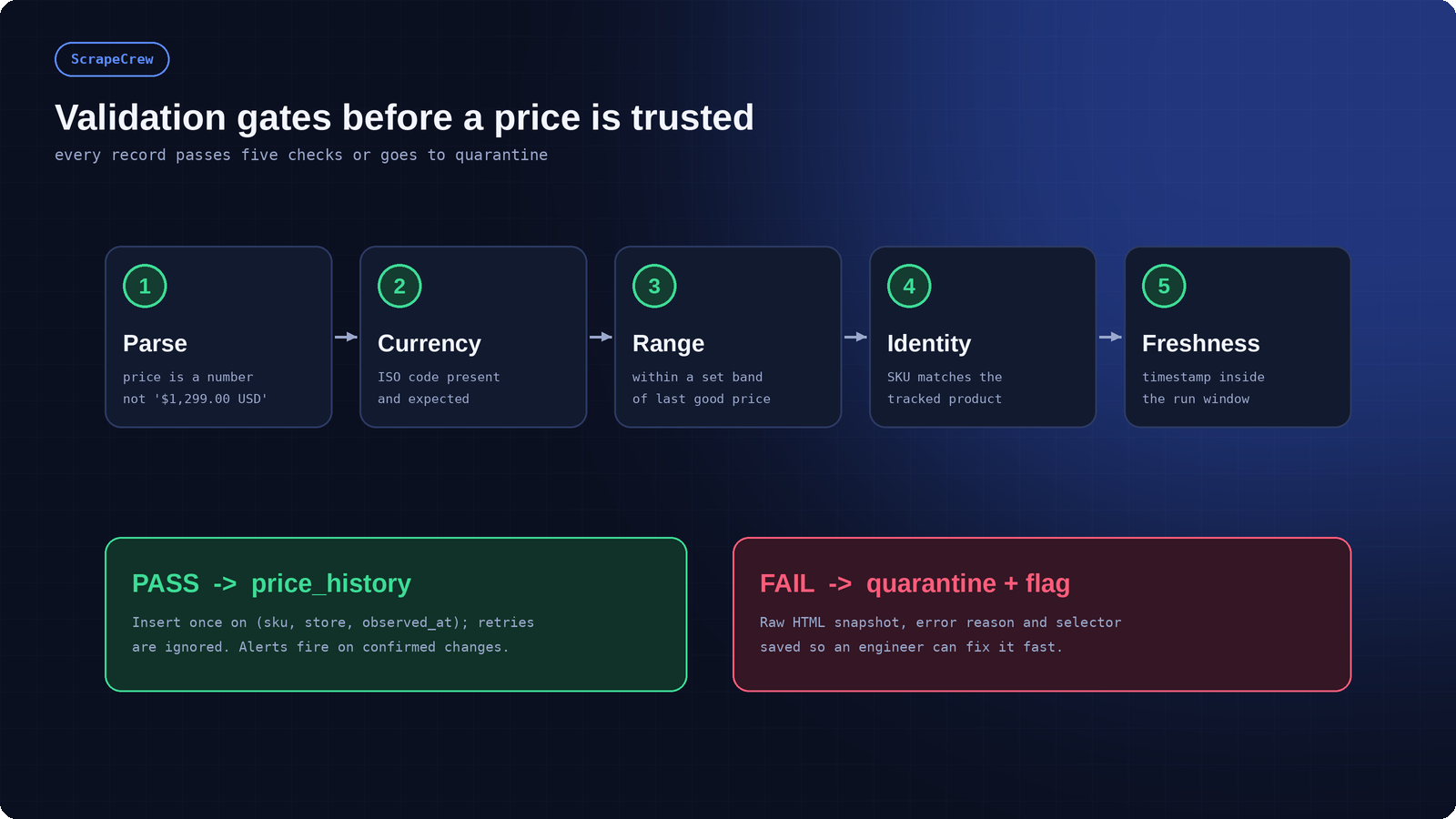
Five validation gates decide whether a record reaches price history or is quarantined and flagged.
The five gates below catch the large majority of silent errors. Define them as code, not as a document, so they run on every record. A library such as Pydantic makes typed validation concise in Python.
Gate | Rule | Example it catches |
|---|---|---|
1. Parse | Price must convert to a positive decimal | The text 'Call for price' stored as 0 |
2. Currency | ISO code present and in the expected set for that store | Euros recorded as dollars after a locale change |
3. Range | New price within a configurable band of the last good price (for example, 50%), or flagged for review | A '$1' price from a hidden placeholder element |
4. Identity | Identifier or key attributes still match the tracked product | A redirected URL now showing a different model |
5. Freshness | Timestamp falls inside the current run window | Cached or replayed data presented as new |
The range gate deserves care. A large move is sometimes real, such as a clearance sale, so do not reject it outright. Route extreme moves to a review state, confirm them with a second observation, and only then let them trigger alerts. This single habit eliminates most false positives.
Also watch the structure of the pages themselves. A sharp drop in field coverage on one store, for example from 99% to 70%, is a sign of schema drift: the page changed even though your scraper still returns something. Alert on coverage, not only on errors.
A price monitor is only as useful as its history. Store each observation as a new row rather than overwriting the old one, so you can chart trends, calculate volatility and prove what a competitor charged on a given day. The key design question is how to tell a genuinely new observation from a retry of one you already saved.
The rule is simple. Assign the observation timestamp once, when the check is scheduled, and reuse that exact value for every retry of that check. Then enforce a unique constraint on (sku, store, observed_at). A new scheduled run gets a new observed_at, so it is stored as a new observation. A retry of the same run carries the same observed_at, so it collides with the existing row and is ignored. Record the real completion time separately in a fetched_at column. PostgreSQL's INSERT ... ON CONFLICT clause supports this directly:
CREATE TABLE price_history (
  sku            text        NOT NULL,
  store          text        NOT NULL,
  observed_at    timestamptz NOT NULL,   -- set at scheduling, reused on retries
  fetched_at     timestamptz NOT NULL DEFAULT now(),
  price_active   numeric(12,2) NOT NULL,
  price_list     numeric(12,2),
  currency       char(3)     NOT NULL,
  availability   text        NOT NULL,
  source_method  text        NOT NULL,
  CONSTRAINT price_history_uniq UNIQUE (sku, store, observed_at)
);

INSERT INTO price_history
  (sku, store, observed_at, price_active, price_list, currency, availability, source_method)
VALUES
  (%(sku)s, %(store)s, %(observed_at)s, %(price)s, %(list)s, %(cur)s, %(avail)s, %(method)s)
ON CONFLICT (sku, store, observed_at) DO NOTHING;
This keeps history immutable: the first valid write for a given observation wins, and retries are harmless. If the insert reports zero rows, count it as a retry duplicate, not an error. If you ever need to correct a stored value, do not quietly overwrite a few columns. Either update every relevant field together (price, list price, currency, availability and source) in one statement, or better, write the correction as a new row with its own revision marker so the original stays auditable.
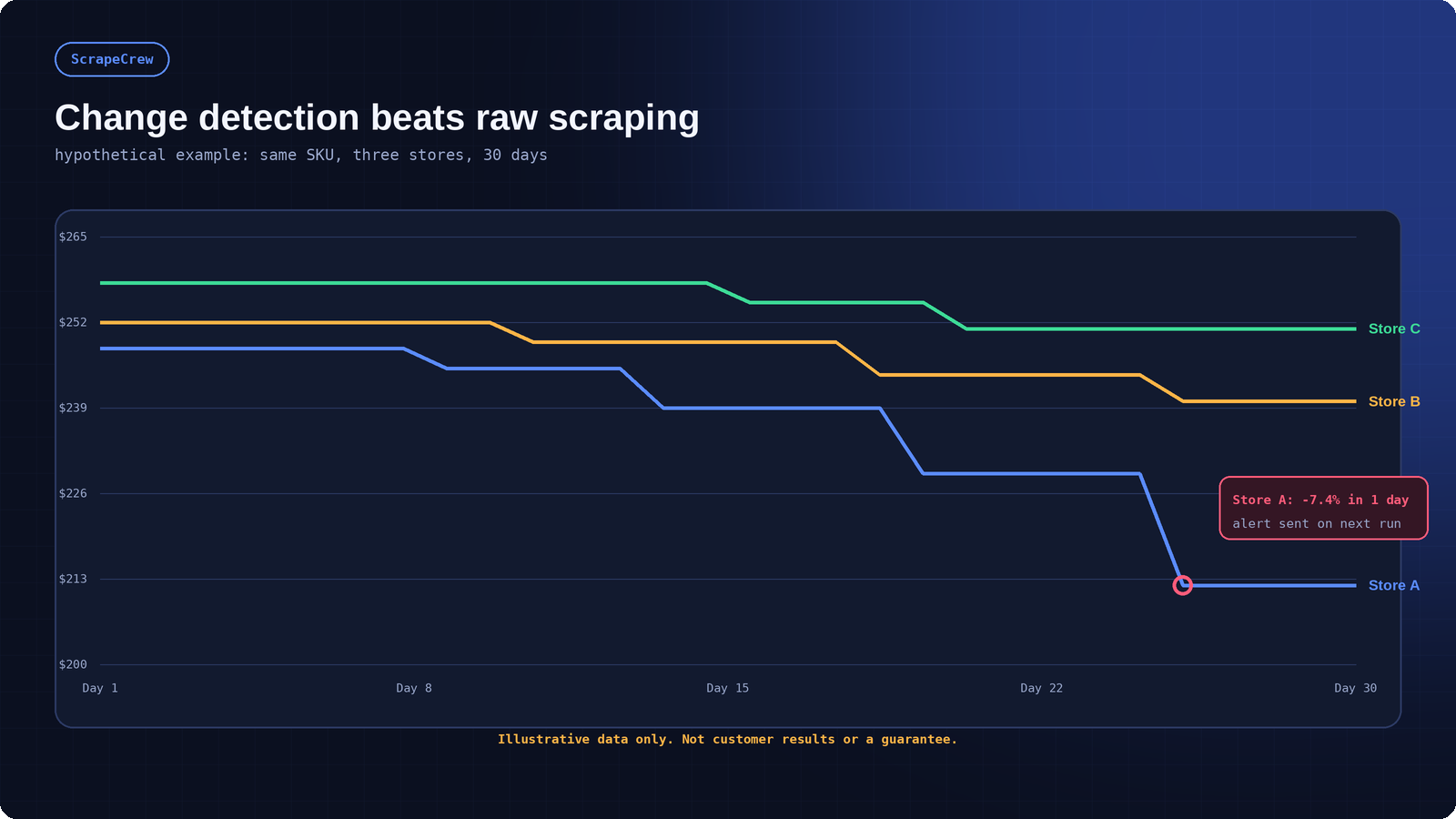
Hypothetical example: three stores tracked for the same SKU. Change detection fires only when a validated price actually moves.
Change detection compares each validated observation with the previous accepted one. Alert on meaningful differences: a drop beyond your threshold, a store going out of stock, a competitor undercutting your price, or a price returning to normal. Do not alert on every re-scrape of an unchanged page, and be careful with sites that republish unchanged listings as new ones. Fingerprinting each listing (a hash of price, title and key attributes) separates a genuine change from a republish.
The same logic supports incremental crawling: revisit fast-moving SKUs often and stable ones rarely, based on how frequently each has changed in the past. It reduces request volume and keeps your footprint on target sites small.
Scheduling turns a script into a system. Use a real orchestrator or a managed scheduler instead of a cron line you forget about. Apache Airflow is a common choice because it provides dependencies, backfills, retries and a run history in one place, though a simpler queue and worker setup is fine for small jobs.
Retries need rules. Retry transient failures such as timeouts and 5xx responses with exponential backoff and a hard attempt limit. Do not retry blindly on 403 or verification pages, because repeated hits make the situation worse and burn proxy budget. When a site returns HTTP 429, honor the Retry-After header and slow down. Log every retry with its reason so you can see patterns.
Politeness is also practical. Check each site's robots.txt, which follows the Robots Exclusion Protocol standard (RFC 9309), and respect its crawl guidance. Identify your bot honestly, keep concurrency per domain low, spread requests over time, and cache pages you have already fetched. A pipeline that makes fewer, smarter requests is both more ethical and more reliable than one that hammers a site until it is blocked.
Most pipeline failures are quiet. A selector matches the wrong element, a proxy route degrades, a store adds a consent wall, and the job still reports success. Monitoring exists to make those failures loud. Track metrics for the pipeline itself and alert when they cross a threshold.
Metric | Healthy signal | Alert when |
|---|---|---|
Success rate per store | Stable and high across recent runs | It drops sharply for one store or route |
Field coverage | Price, currency and availability present on nearly every row | Coverage falls below your baseline |
Freshness | Newest observation per SKU inside the target window | Any tracked SKU goes stale |
Quarantine rate | Small and steady | It spikes after a site change |
Proxy route health | Even success across geographies | One country or route fails repeatedly |
Alert noise | Few false positives per week | Operators start ignoring alerts |
Give the team one view that shows these metrics, and name an owner for failures. A pipeline with a dashboard nobody reads is the same as a pipeline with no monitoring.
Even well-built pipelines meet the same handful of problems. Knowing them in advance shortens every incident, because you can recognize the symptom and go straight to the likely cause instead of rebuilding the scraper from scratch.
Symptom | Likely cause | Fix |
|---|---|---|
Prices suddenly blank | Selector changed after a redesign | Prefer JSON-LD or API fields, add coverage alerts, update selectors from quarantined snapshots |
Same price on every region | Exit location, currency, cookies or store location settings not matching the target market | Cross-check IP location, set locale, currency and delivery location explicitly, use clean sessions |
Many 403 responses | Request pattern flagged or route degraded | Slow down, lower concurrency, switch route type, stop blind retries |
Alerts on every run | No change detection or fingerprinting | Compare against the last accepted record and confirm with a second observation |
Wildly wrong comparisons | Weak product matching or pack-size mismatch | Match on GTIN or MPN first and queue uncertain pairs for review |
Gaps in history | Failed runs not flagged | Alert on stale SKUs and record run status for every job |
Notice that almost none of these are solved by collecting more data. They are solved by better structure: identifiers, validation, history and visibility. That is why the early design decisions in this guide matter far more than the choice of any single library.
A technically perfect pipeline can still create legal and reputational problems if it is aimed at the wrong data. Keep collection focused on publicly available product and pricing information. Review each target's terms of service and robots.txt, avoid personal data, do not bypass logins or security controls you are not authorized to use, and keep documentation of what you collect and why. Rules differ by country and platform and can change, so involve legal counsel for anything borderline. Nothing in this guide is legal advice.
Be equally honest about technical limits. A clean proxy route does not guarantee a store will serve the same page it serves a human. A validated price is only as correct as the page it came from. Pipelines reduce risk and make it visible, but operators remain responsible for how the data is collected and used.
Building the first version of a price monitor is the easy part. The cost is in what comes after: fixing selectors when stores redesign, rotating routes when blocks rise, adding stores, and keeping alerts accurate. Teams with strong engineering capacity and a small, stable list of sources often do well in-house. Teams that track many stores, need regional accuracy, or cannot spare engineers for upkeep usually benefit from a managed build.
If you would rather not run that upkeep yourself, ScrapeCrew's ecommerce price monitoring scraping services cover store and SKU mapping, price tracking and issue detection. Browse the ready-made scrapers or contact the team to scope a build. Many teams pair a proxy provider such as OmegaProxy with a specialist team for extraction and monitoring.
Match frequency to how fast prices move. Volatile categories such as consumer electronics may justify hourly checks, while stable catalogs can run daily. Use history to adjust: SKUs that change often get more frequent checks.
Not always. A small number of friendly stores may need none. You will want a proxy layer when you track many stores, need region-specific prices, or see blocks. Choose the proxy type from the workflow, not from price alone.
Silent parsing errors and weak product matching. Both are solved by validation gates, raw value retention and identifier-first matching, not by more requests.
Yes, when one exists and covers the fields you need. APIs are the most stable option. Many teams combine an API for marketplaces with browser or HTML collection for stores that offer none.
A reliable price monitoring pipeline is less about clever scraping tricks and more about discipline: a clear SKU map, the most stable fetch method per store, a proxy layer matched to the job, strict validation, honest history, and monitoring that makes failures loud. Build those pieces in order and your team stops asking whether the data is right and starts using it. If you would rather have a team build and maintain the system, ScrapeCrew is ready to help.

With the continuous development of the Internet, more and more websites and applications need to use HTTP proxy IP to achieve access control, anti-crawling, data collection and other functions. However, how to choose the best HTTP proxy IP, is a more comp

An IP proxy pool is a pool of multiple proxy server IP addresses used to provide proxy services. Each proxy server has a separate IP address, and when you access a website or application on the Internet through a proxy server, you use the proxy server's I

With the acceleration of globalization, more and more enterprises and individuals begin to pay attention to overseas markets. Overseas questionnaire survey is an effective means for market research and survey personnel. However, due to various reasons, ov

Proxy IP is an important networking tool that is widely used in various fields, including but not limited to web crawlers, data collection, and anonymous browsing of websites. With the development of the Internet and the diversification of application req

403 Forbidden error is one of the common errors we encounter when browsing a web page or accessing a resource. This error message means that the server rejected our request, indicating that we do not have permission to access the resource.

Several methods of IP address replacement In today's Internet era, IP addresses are particularly important as network passes for Internet access devices. Without it, network access would not be possible.

In today's big data network era, Internet marketing has become a common promotion method for many enterprises and companies.

In today's society, online games and stand-alone games have become one of the main ways for people to kill time and entertainment, and related industries have gradually grown. Today's most popular game studios, for example, use one or more computers to ma

In today's Internet era, the Internet plays a vital role in people's work and life. Whether surfing the Internet using a wired or wireless network, we all need an IP address to connect to the Internet. When we connect to WiFi, we will notice that we need

In today's day and age, many people often need to change their IP address, whether for work needs or personal reasons. In the market, the easiest way to change IP addresses is through IP proxy software.
Collect Web Data Easily with OmegaProxy Residential Proxies

Một trong những giấy ủy quyền tốt nhất. Hơn 90 triệu IPs đang hoạt động trên toàn thế giới. Chọn địa chỉ IP từ bất kỳ quốc gia hoặc thành phố nào.





