





Proxy Residencial QUENTE
QUENTERastreamento humanizado, sem blindagem IP. Desfrute de 90 milhões de IPs reais de 220+ locais
 2025-04-21 17:50:52 actualização
 14888 ver
 5 Minutos para ler
Step 1: Obtain the proxy in the Get Proxy of Dashboard and export it (taking Residential Proxies as an example)
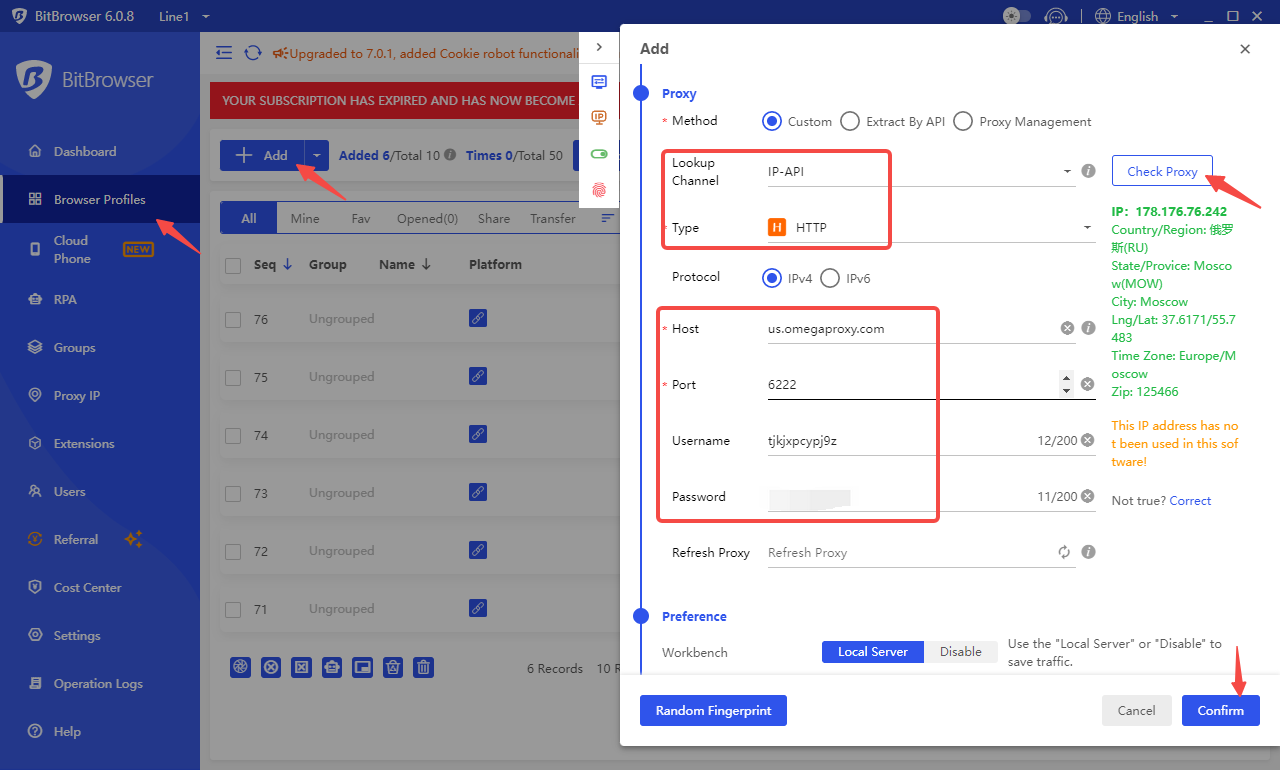
Step 2: Open Bit Browser, click the Browser Profiles, add one window, select ip-api as the IP Lookup Channel, and select HTTP and Socks5 as the proxy type. Enter the obtained proxy information and check the connection. If the connection is successful, you can use it.
Step 1: Obtain the proxy in the Get Proxy of Dashboard and export it (taking Residential Proxies as an example)Step 2: Open Adspower, create a new browser, select HTTP and Socks5 as the Proxy type, and select ip-api as the IP checker. Enter the obtai
Step 1: Obtain the proxy in the Get Proxy of Dashboard and export it (taking Residential Proxies as an example) Step 2: Open the Morelogin browser and log i your account. Click New Profile. Step 3: Find the proxy settings in the Advanced create: select
Step 1: Obtain the proxy in the Get Proxy of Dashboard and export it (taking Residential Proxies as an example) Step 2: Open the Incogniton browser, log in your account, and click Browser Profile Creation.
Step 1: Obtain the proxy in the Get Proxy of Dashboard and export it (taking Residential Proxies as an example) Step 2: Open the Incogniton browser, log in your account, and click CREATE PROFILE.
Step 1: Abstract the proxies in the dashboard and export it. Step 2: Open DICloak, select Profiles, and click Create Profile: Step 3: Select the Proxy settings on the left, click the proxy type (you can select HTTP or Socks5), enter the proxy informa
Collect Web Data Easily with OmegaProxy Residential Proxies

Um dos melhores proxies. Mais de 90 milhões de IPs estão ativos em todo o mundo. Selecione um endereço IP de qualquer país ou cidade.






