





Residential Proxy HOT
HOTHumanized crawling, no IP shielding.Enjoy 90M real IPs from 220+ locations
 2025-04-21 17:50:52 updated
 16571 views
 5 min read
Before configuring, please Get Proxy first
Step 1:Open the Firefox
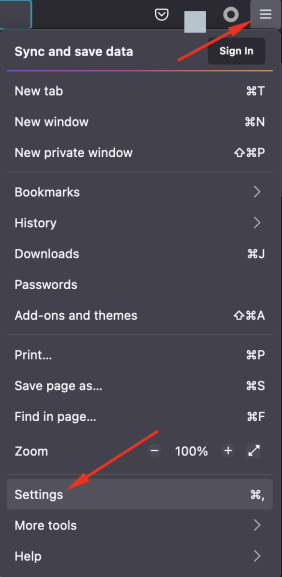
Step 2. Click Set icon> Settings (or Preferences on macOS).
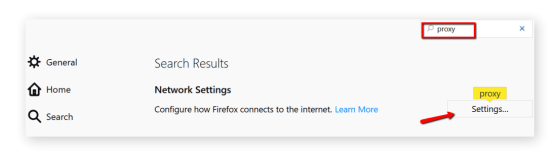
Step 3:Click on the General tab.
Step 4:Scroll down to the Network Proxy section, and then click Settings.
Step 5:Select the manual proxy configuration box.
Step 6:Add the ip address or host address and the port to the HTTP proxy field. Select to also use this proxy for the FTP and HTTPS check boxes.
Collect Web Data Easily with OmegaProxy Residential Proxies

One of the best proxies. More than 90 million IPs are active worldwide. Select an IP address from any country or city.





